-
-
Open Source Ideas
All too often, I have ideas which might make a cool website or iPhone app or whatever and I know I just don't have the time to build them. I'm going to post them here in the hope that someone else might find a use for them. These ideas might already be in existence, of course. I'm not claiming they are unique in any way (although some might be).
You are free to take these ideas and do whatever you like with them. Of course, if they become amazingly successful, I could do with a bigger TV...
-
PrologCSS
Seeing as both Prolog and CSS are declarative languages, I found myself wondering if it would be possible to create a mapping from one to the other. It was an interesting thought experiment that quickly found itself being turned into code.
Way back when, Prolog was actually one of the first languages I learned to program in. It had been a while since I'd last used it for anything (a chess endgame solver in high school, I think) so I looked up an online tutorial. The following example is derived from section 1.1. of Learn Prolog Now
Simple rules
If you think of Prolog facts as denoting true/false attributes of elements, you can consider every known item in a KnowledgeBase (KB) as a DOM Element. For example:
mia.Is equivalent to:
<div id="mia"></div>While
woman(mia).Equates to:
<div id="mia" class="woman"></div>You can make multiple statements about an item in the KB:
woman(jody).
playsAirGuitar(jody).
Which is mapped to:
<div id="jody" class="woman playsAirGuitar"></div>You can then represent these facts using visual attributes:
.woman {
  background: yellow;
}
.playsAirGuitar {
  border: 1px solid black;
}
The only real issue is that CSS values can’t be aggregated. If they could be, you could always use the same attribute (e.g. box-shadow) and combine them:
.woman {
  box-shadow: 1px 1px 0 red;
}
.playsAirGuitar {
  box-shadow: 2px 2px 0 red;
}
You'd want this to render two box-shadows, one with a 1px offset and one with a 2px offset.
Instead, you have to use a unique CSS attribute for each class of facts. However, for the simplest examples, It’s not too complicated...
If you want to query the KnowledgeBase, you need to map a standard Prolog query such as:
?- woman(mia).Into the a different output mechanism: HTML.
The response is visualised in HTML and CSS using the following rules:
- There is an element with id "mia"
- There is a class "woman"
- The element with ID "mia" has the class "woman"
In the demo below, you can read this by verifying that the #mia div has a yellow background. Done.
Here's the complete KnowledgeBase for the first section of "Learn Prolog Now".
<!-- woman(mia). -->
<div id="mia" class="woman"></div>

<!-- woman(jody). -->
<!-- playsAirGuitar(jody). -->
<div id="jody" class="woman playsAirGuitar"></div>

<!-- woman(yolanda). -->
<div id="yolanda" class="woman"></div>

<div id="party"></div>
And here are the queries that could be answered by looking at the visual output:
?- woman(mia). Yes (the element with id="mia" has a yellow background) ?- playsAirGuitar(jody). Yes (the element with id="jody" has a solid black border) ?- playsAirGuitar(mia). No (the element with id="mia" does not have a solid black border) ?- playsAirGuitar(vincent). No (there is no element with id="vincent") ?- tattooed(jody). No (there is no CSS style for a class '.tattooed') ?- party. Yes (the element with id="party" exists) ?- rockConcert. No (the element with id="rockConcert" does not exist)More complex rules
It starts to get tricky when you have rules depending on other values such as
?- happy(jody):- playsAirGuitar(jody)
(“If jody plays air guitar, jody is happy”)
But I think some clever element nesting could handle that.
First, change the structure so that the classes/properties are on parent elements
<div class="woman">
    <div class="playsAirGuitar">
        <span id="jody"></span>
    </div>
</div>
Make properties into divs and entities into spans
Then update the structure of the rules:
.woman span {
    background: yellow;
}
.playsAirGuitar span {
    border: 1px solid black;
}
Now you can make rules dependent using the cascade. First, add the property:
<!-- happy(jody):- playsAirGuitar(jody) -->

<div class="woman">
    <div class="playsAirGuitar">
        <div class="happy">
            <span id="jody"></span>
        </div>
    </div>
</div>
Then create the rule:
.playsAirGuitar .happy span {
    box-shadow: 1px 1px 0 red;
}
The rule for
happy(jody)will only be true (show box-shadow) if the rule forplaysAirGuitar(jody)is also true.Conclusion
Sure, it's all a bit silly but it was quite a fun little experiment. There are probably a few big aspects of Prolog that are unmappable but I like to think it might just be possible to create a chess endgame solver using nothing but a few thousand lines of CSS.
-
Open Source Snacks
In my opinion, seed snacks are pretty much the perfect web dev snack: they're tasty, they're low-fat, they're vegan-friendly, they're gluten-free. I've always got a tub of some next to my monitor so, when I'm chewing over a tricky layout, I can grab a handful and chew them, too.
This repository collects some of my favourite seed recipes and I'm hoping that other web devs can clone the project, roast their own, suggest improvements and submit a pull request. If you have any other easy to make snacks (such as nut snack recipes), feel free to submit them, too.
Eating tips
From observation, seed eaters tend to fall into one of these categories:
Pour-and-snarf

Pour a few into your hand, tip them into your mouth in a oner. Good when you're in a hurry. Can lead to stray seeds falling into the keyboard.
Considerate Ant-eater

Pour a few into your hand, stick your tongue into the pile of seeds, retract.
Solo Ant-eater

Stick your tongue directly into the tub of seeds. Clean, efficient, not good for sharing.
Ice-cream scoop
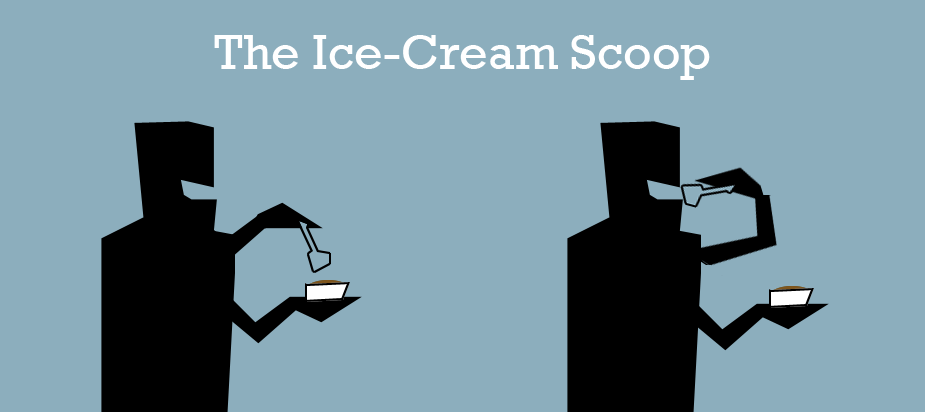
Use a spoon. Good for sharing and minimises mess. Prevents multi-tasking. Feels kind of like using your mouse to go Edit > Copy when ctrl-C is right there.
Rousing call-to-arms
The stereotypical image of the geek - bottle of cola on one side, jumbo bag of chips on the other, little desire to do anything beyond the computer - has never really been true for the majority. We're all kinds of different people - mountain climbers, cyclists, needlepoint workers, knitters. The people that played on the football team and the ones who didn't get picked. We deserve more than just nachos.
Also nachos.

-
How App.net became useful
After Twitter started announcing changes to its API usage and people started to get worried about the future of the developer eco-system, App.net appeared. It provides a streaming data-platform in much the same way Amazon provides a web hosting platform. The reason for the Twitter comparison is that one of the things you can make with it is a Twitter-like public short message system. This was, in fact, the first thing the App.net developers made to showcase the platform: Alpha although that example seems to have convinced many people that the whole point was to build a Twitter-clone instead of a service whose purpose is to stream small, discrete blocks of meta-tagged data. The community-developed API spec is an important aspect of App.net as well although feature discussions can devolve into musings on Computer Science theory a bit too easily.
For the first couple of weeks, it was fun to just hack around with the APIs, post a bit, build a little test app (disabled now that more App.net clients have push notifications). It all became much more interesting, however, when two new features were added to the platform – Machine-only posts and Well-known Annotations.
Machine-only posts
Pretty much exactly what they sound like. These are posts that are not intended to be viewed in any human-read conversation stream. They still get pushed around the network exactly the same as all other posts but to see them, you must explicitly say 'include machine-only posts' in your API calls. For developers who have been building silly toys on Twitter for a couple of years, this is fantastic. You don't need to create a separate account purely for data transfer. This can be part of your main account's data stream. I have quite a few Twitter accounts that I just use for outputs from various applications. I have one, in fact, that does nothing but list the tracks I listen to that I created for this side-project.
By classifying these as
'machine-only', they can stay associated with the user and subject to whatever privacy controls they have set in general. This makes it far easier for the user to keep control of their data and easier for the service to track accurate usage. For devs, it also means you can hack away at stuff, even if it is to be public eventually, without worrying too much about polluting the global stream with nonsense.Well-known Annotations
Annotations were part of the spec from the beginning but only implemented at the end of August. Annotation is just another word for per-post meta-data – each post has a small object attached which provides extra information. That's it.
The annotations can be up to 8192 bytes of valid JSON which is quite a lot of meta-data. Even with this, however, the usefulness is limited to per application use-cases until some standards start to appear. There's nothing to stop a popular application being the one to set the standard but for the more general cases, it is most fitting to continue with the community-led development model. This is where Well-known Annotations come in.
Well-known annotations are those attributes which are defined within the API spec. This means that the community can define a standard for 'geolocation', for example, and everyone who wants to use geolocation can use the standard to make their application's posts compatible with everybody else's.
Obviously, I'm quite into my geolocated data. I love a bit of map-based visualisation, I do. Here's a sample of jQuery that will create a post with a standard geolocation annotation:
$.ajax({
  contentType: 'application/json',
  data: JSON.stringify({
    "annotations": [{
      "type": "net.app.core.geolocation",
      "value": {
        "latitude": 52.5,
        "longitude": 13.3,
        "altitude": 0,
        "horizontal_accuracy": 100,
        "vertical_accuracy": 100
      }
    }],
    machine_only: true
  }),
  dataType: 'json',
  success: function(data) {
    console.log("Non-text message posted");
  },
  error: function() {
    console.log("Non-text message failed");
  },
  processData: false,
  type: 'POST',
  url: 'https://alpha-api.app.net/stream/0/posts?access_token=USERS_OAUTH_TOKEN'
});
In the same way as the machine-only posts, these annotations aren't provided on a default API request, you have to specifically ask for them to be included in the returned data. This is to make sure that the majority of use cases (public streaming, human-readable conversation) don't have to download up to 8KB of unnecessary data.
Retrieving both
This is an API call to retrieve posts marked machine-only and with annotations
Potential use cases
You might have noticed, the API call above had the machine-only attribute as well as the well-known geo annotation. If I wanted to create an app that would run on my phone and track my routes throughout the day, all I would need to do would be to run that
$.ajaxcall periodically with my current geolocation. The data would be saved, distributed, streamed and could be rendered onto a map or into a KML at the end of the day. I could record hiking trails or museum tours, or share my location with someone I'm supposed to be meeting so they can find out where I'm coming from and why I'm late. That's just a couple of the single-user cases. Having a shared standard means that the potential for geo-tagged posts opens up to at least equal that of Twitter's. Heatmap-density diagrams showing areas of the most activity; global and local trends; location-based gaming. Add a'news'annotation to geotagged posts and suddenly you've got a real-time local-news feed. Add'traffic'and you've got community-created traffic reports.There are so many clever things you can do with location-tagged data. I hope others are just as enthused about the possibilities as I am.
-
Web Page Screensavers
I don't find myself using screensavers that much these days. Sure, they made sense when you needed to avoid burning a ghost of the windows start bar into your CRT monitor but with TFTs, LEDs, projectors, OLEDs and whatever else, it's rare you'll find hardware that actually needs protecting like that any more. On top of that, in my case, I'm either at my desk coding or at the coffee machine refilling. There aren't that many opportunities for me to appreciate a warp-speed starfield or some infinite pipes.
What I'm saying is: I miss screensavers.
Since I started writing for CreativeJS, I've seen a lot more examples of clever, cool, pretty and downright creative demos and toys written in JS than I ever had before. You can probably figure out where I'm heading with this: these would make cool screensavers.
A quick bit of googling later and I found a couple of applications that let you set a web-page fullscreen as your screensaver. Of course, you can't just set any old demo as your screensaver, many of them rely on user interaction which kinda defeats the purpose.
Downloads
OS X
Unfortunately, this uses plain-old standard WebKit so no WebGL demos. Maybe someone can fork Chromium to make it do this.
Windows
This one seems to be based on IE so it probably won't work with the canvas-based demos below. If you can point me to a WebKit-based one, I'll include that instead.
Old-school screensavers
Flying Windows
http://dl.dropbox.com/u/16145652/flying/flying.html
Starfield by Chiptune
http://www.chiptune.com/starfield/starfield.html
Non-canvas
Insta-Art by me
http://thelab.thingsinjars.com/insta-art.html
Newsola by Nick Nicholaou
Canvas
Falling blocks by Lionel Tardy
http://experiments.lionel.me/blocs
MMOSteroids by Seb Lee-Delisle
http://seb.ly/demos/MMOsteroids.html
Origami by Hakim El Hattab
http://hakim.se/experiments/html5/origami/
The Single Lane Superhighway by Aaron Koblin and Mr.doob
http://www.thesinglelanesuperhighway.com/
Ablaze by Patrick Gunderson
http://theorigin.net/ablazejs/
Visual Random by Dimitrii Pokrovskii
Circle Worm by Ilari
http://style.purkki.ilric.org/projects/js_wave/
Boids by Jason Sundram
http://viz.runningwithdata.com/boids/
3D Globe by Peter Nederlof
http://peterned.home.xs4all.nl/demooo/
Moonlander by Seb Lee-Delisle
http://moonlander.seb.ly/viewer/
WebGL Needed
Just in case someone in the comments finds a WebGL-capable screensaver, here are the demos I liked that require WebGL.
Clouds by Mr.doob
http://mrdoob.com/lab/javascript/webgl/clouds/
WaterStretch by Edouard Coulon
http://waterstretch.ecoulon.com/
Further Development
The ideal screensaver would allow you to enter several different URLs to allow you to easily save them. There should also be a checkbox to mark demos as 'works offline'. That way, when the screensaver starts, it checks for connectivity then displays a screensaver that doesn't require a connection.
Add your suggestions below.